Showing posts with label NodeRED. Show all posts

Saturday, December 30, 2017

My Connected Car: display car position on a Map

I'm currently working on the Python module that is in charge to read data from OBDII and send data to the MQTT broker.

In the meanwhile, I'm exploring how to add position (latitude, longitude from GPS) and display these positions on a Map.
Till now, I don't have a working GPS module on my RPI (I have two available, still in test phase).

But, since I have decided to use a SmartPhone to provide connectivity to Internet, one solution I have found (for now) is to use  OwnTracks.

In addition, I have added WorldMap to my NodeRED instance. And, with a simple flow, I'm able to show the current position of my Car on a Map.

Amazing...


In release 2 of my project, I'll integrate it with Oracle IoT Fleet Management. With this integration enabled I'll get many more features. An example is the view shown below, that shows cars' locations on a map.


Stay tuned.

Thursday, December 15, 2016

Almost Human: talking with your IoT

NewImage
Fig. 1
For every system User Oriented, the User Interface is one of the most important building block, and you need to carefully think about it.
In the past, the most used type of UI was a Web UI. Today, we tend to prefer a Mobile App, since our SmartPhone is (almost) always with us.
But we should be honest, a UI where we have to push buttons, move sliders, check boxes, is not the way we would love to work and live.

The dream, one of the dreams of AI, is to be able to use Natural Language to interact with a System, better through voice.
But this is still not so easy, everyone of us have at least one time laughed at the mistakes that SIRI does, sometime (or more often than that).

Surely, this can be, will be the future, but think about it: there are still moments when you can’t or don’t want to use voice (for example, don’t want to be heard by someone else).

Here comes ChatBot: chat were you’re interacting with a “Robot”.
If you want to understand better what a ChatBot is , maybe you can resort to Wikipedia. I don’t pretend to teach you this.

But, working on my Concept Prototype of IoT, my HomeAuto system, I decided that I wanted to explore how to use a ChatBot as interface.
I discovered that with Telegram you can easily set-up a Bot and, more important, Telegram has an Open API. This makes it easy to develop the System-User Interface.

More details: i don’t want to write code, or better, I prefer to write as little code as possible. Therefore I decided to find out if there are modules for NodeRED useful to simplify the interaction with a TelegramBot.
Yes, there are.
Therefore, the building blocks are:
  • A Cloud Service, with an Open API, that enables you to create a Bot, enable to interact through API with the Bot and provides you a Mobile Apps; Telegram is Ok;
  • A Middleware that enables you to visually develop flows to interact with your Things: NodeRED;
  • A module for NodeRED that simplify the creation of flows capable to interact with the Bot: here I have found 

All this pieces, in my Home, runs on a Raspberry PI 3.
It works!
  • I can ask, using the Telegram App: “Show me T2” (Temperature in Room 2) 
  • I have developed a flow that checks the readings from a GAS sensor in the kitchen and, if the reading is above a certain threshold, it sends me an alert on Telegram (can be also a Voice Message)
  • … I’ll do more in the next week
 In the fig. 1, at the beginning of the post, you have seen an example of the conversation with the Bot.
 This is a snapshot of the NodeRED flow that implements the conversation above
NewImage
Not complicated, really.

You can see in the picture “Telegram Receiver” and other nodes taken from node-red-chatbot. 
Nice. Obviously the implementation of a “Language Interpreter” is the most difficult part. In my prototype, where I have used RiveScript, sentences recognized are very few and simple.

If you want to implement some serious thing, you need a NLP service: Natural Language Processing.
See you soon.

Saturday, November 19, 2016

Home Automation (2): A Nice and Responsive User Interface

NewImage

I have decided to start from the end, the Front End.


But, before talking about how I have designed and built my UI, I need to give you a quick overview about the Messaging Infrastructure.

The communication between all the devices (equipped with sensors) and the Hub/Gateway is all based on MQTT protocol, over WI-FI.

In the near future I plan to add some Z-Wave devices (lights and plugs), but for now the underlying network is Wi-FI.

I don’t need to spend much time about MQTT, I Have written many blog’s posts on why it is the best and most widely used messaging protocol in IoT (Have a look at my previous posts).

The MQTT broker used is Eclipse Mosquitto 1.4, installed on a Raspberry PI 3 (RPI 3).

Every 30 seconds from each one of the rooms in my House an MQTT msg is sent to a dedicated topic. The serialization format chosen is JSON and a message carries several readings (Temperature, Humidity, Pressure, Light).

In addition, the same messaging approach is used to send commands and configuration changes from the Hub to a device (but I’ll address this side of the communication in another post).

Having said that, every information comes to the MQTT broker. You need only to subscribe to a Topic or a set of Topics and you will receive the information, every 30 sec., in JSON format.

I have setup OpenHAB 2, and OpenHAB has a nice Mobile UI and can directly bind items on the UI to MQTT topics.

But, I wanted also to develop a Nice and Responsive custom UI, without, if possible, writing too much code.

After many investigation, I discovered that there is a set of Node for Node-RED making really easy to develop a Web Front End.

These nodes are part of the module: node-red-dashboard, that I have installed in the Node-RED directory

(see: https://www.npmjs.com/package/node-red-dashboard)


After having installed it, you see a nice new set of nodes in the Node-RED palette:
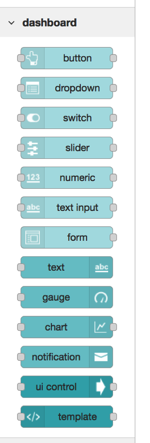
NewImage

Therefore, these are the main points behind Message Elaboration and UI:

  • I have developed a set of Node-RED flows. Almost every flow starts from an MQTT input node: a message on a topic or set of topics (with wildcard) triggers the start of the flow;
  • A flow typically transforms the message, extracts the relevant information and sends the message to a Node associated to a Widgets in the UI
  • I have used several kind of Widgets: Text, Chart, Gauge, arranged in Groups and Two Tabs


All the Widgets are arranged in two Tabs: 

  • The first one contains the widgets showing all the data coming from Sensors, arranged by Room;
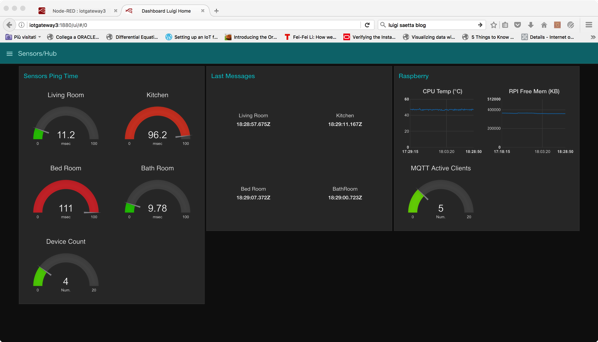
  • The second one contains a set of widgets to enable to keep under control the infrastructure; information displayed are: RTT for sensors, Number of Active Sensors, PI CPU Temperature Free Memory.


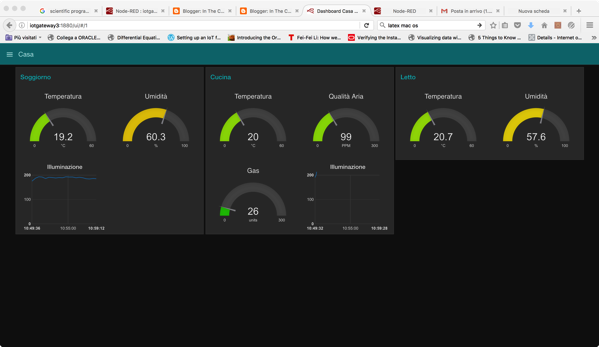
Here you see a snapshot of the First Tab:  

NewImage


One of the important feature that I have added is a measure of the Air Quality and Gas concentration in the Kitchen (Group in the middle, above), useful, for example, to verify if there is a Gas Leak or if, during cooking for example, the Quality of the Air becomes too bad (can be, if windows are closed).

In the near future I plan to add also Alerts. One possible choice is to implement rules in Node-RED flows. I’m investigating the best way (if you have suggestions, please leave a comment!)
NewImage

 To have an insight in the Infrastructure, I gather and display several information:

  • Ping response time for all the sensors, as measured from the Hub/Gateway;
  • Number of Connected Devices (devices with last message sent not older than 5 minutes);
  • Timestamp for messages;
  • Information relevant to the HUB: CPU temperature (RPI 3 tends to become hot), free memory and number of clients connected to MQTT broker (for now X devices + Node-RED) 


All the message elaboration (+ UI generation ) is organized in three flows:

  • HomeAuto Main Flow
  • Networking
  • Hub/Gateway


To give you an idea, here you see the flows dedicated to elaborate and display messages coming from the Rooms.

NewImage


To add more details, here you see the flow dedicated to elaborate and display messages coming from the device located in the bathroom
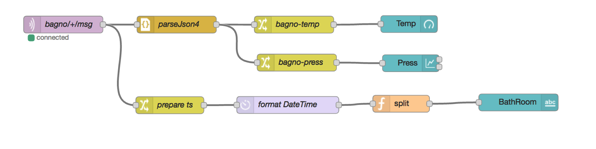
 NewImage The flow starts with a MQTT Input Node. This node subscribes to the topic bagno/+/msg.

(bagno, is the Italian word for BathRoom).

The + wildcard is there to enable, in the future, to have more devices in the same room, each one with a dedicated topic.


The upper part transforms the MQTT message (a string) in a JSON object. Then the two information (Temperature and Air Pressure) are extracted with a dedicated Change Node. The most important nodes from UI are the last (right). These nodes (coming from node-red-dashboard) implement the UI. Temperature is displayed in a Gauge and Pressure with a Chart (from the point of view of Weather Forecast what is more relevant is the Pressure trend).

The lower part registers the timestamp of the message arrival and display it in a Text Widget. In this way I can easily detect if, for some reason, one device has stopped sending messages.

The nice thing is that the UI is really responsive: every time a new message arrives it is updated and. Information are pushed from Node-RED server to your browser, and you don’t need to refresh the browser.  Really Cool. (I think it is based on WebSocket, but not sure till now).

Well, if you want some more details and code (JSON representation of flows) post a comment and I’ll see.

Stay tuned. This is only the beginning. 

Saturday, November 12, 2016

Home Automation (1): the beauty of Visual Programming.

I have written several posts on Node-RED in my blog.
Node-RED is a Visual Programming Environment, based on NodeJS, that can be used to develop flows, to integrate for example an MQTT broker, and to easily manage, transform messages coming from devices. Perfect for IoT.
The nice thing about NodeRED is that it has a small memory footprint (it is based on NodeJS) and therefore it runs perfectly on a RPI 3 with only 1 GB of memory. The kind of device that you can adopt for a local gateway.
On this subject, for example, OpenHAB, that is Java based, takes much more memory.
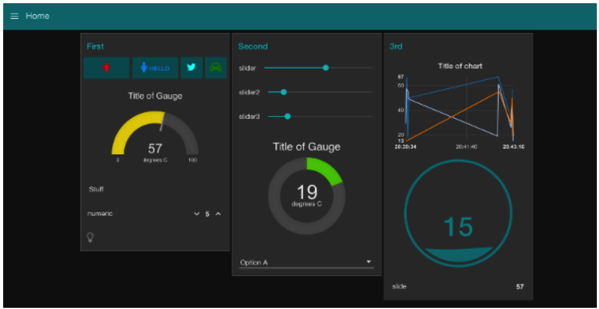
Recently I have discovered that there are some modules for NodeRED that you can easily add and they give you the ability to develop flows with a resulting User Interface (UI).
The widgets that you can employ are the one that you see in one of my previous blog’s post: Gauge, Charts.
Is it difficult to develop some flows, starting from MQTT messages, displaying readings from sensors on a responsive and nice UI? No, a matter of hours.
Here you see a snapshot of the flows I have developed:
NewImage
And here you see one tab of the resulting UI:
NewImage

Readings (temperature, humidity, luminosity, air quality, gas) are coming from: Arduino MKR1000, Intel Edison, Fishino, connected through a WIFI network.

Wednesday, July 20, 2016

IBM Bluemix, IoT and Coursera

Mooc from companies like Coursera are a great way for improving your knowledge and acquire new skills and competencies.

I have recently completed this course on IBM IoT Cloud platform

https://www.coursera.org/learn/developer-iot

I have found really interesting:

  • The rising importance of JavaScript and NodeJS for IoT development
  • How is easy to develop Gateways and Cloud based applications for real-time handling of telemetry data, using Visual Language NodeRED (based on NodeJS)
  • How IBM Bluemix works
  • The central role played by MQTT (well, it was invented by IBM)

If you need more insight into IBM Bluemix IoT and in general IoT Cloud platforms, I would recommend this course. Worth spending some euro to get a Verified Certificate.


Monday, June 27, 2016

Node-Red and IBM Bluemix

I’m progressing, in the free time, my evaluation of Cloud IoT platforms.

As I wrote in a previous blog post, IBM IoT platform is really interesting. One of her strong point is NodeRED, a Visual Programming Language for IoT and Integration, built on top of NodeJS.

I have upgraded my Raspbian Jessie image on my RPI. With the upgrade I have found a new version of NodeRED.

Inside I have discovered, already installed, nodes to communicate with IBM IoT Watson. Nice.

NewImage